WEBAPPS · AI ASSISTANTS

Closer to your customers.
Smarter day-to-day work.

Give customers, visitors and colleagues a digital space that works for them. From a webapp on their phone to an AI assistant that clarifies questions and prepares the next step.

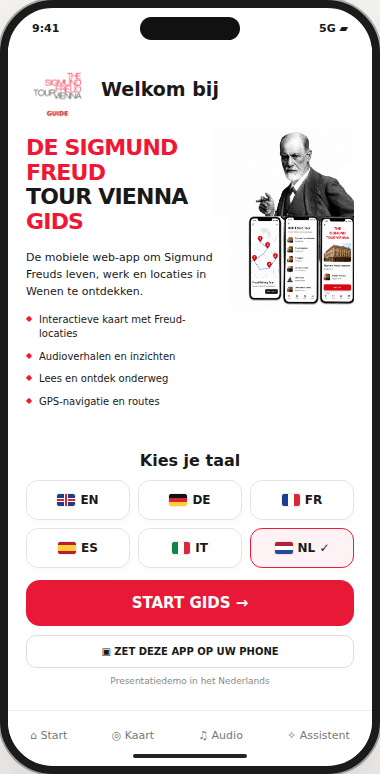
Sigmund Freud Guide
Sigmund Freud Guide
DMEC
DMEC · AI assistants

FROM AN IDEA TO EVERYDAY USE

Your services.
Within easy reach.

A webapp brings information and actions together in one recognisable environment. Customers find their way more easily, while your team can manage requests and content. We start with what users need and what your organisation wants to simplify.

Sigmund Freud Guide

A guide that travels with you.

Sigmund Freud Guide brings places, stories and route information together in one mobile guide. Visitors explore the city at their own pace and find their next step along the way. The demo shows how navigation, language selection, an assistant and an audio interface can form one consistent experience.

DMEC · Huur & Service

Rental and service. Within easy reach.

The DMEC webapp brings rental equipment, service and notifications together on the phone. Customers browse machines, clarify their choice and prepare a rental or service enquiry. The video shows how the range and the next steps come together in one clear interface.

Interactive presentation demos in Dutch. Sample data and simulated conversations; no request is submitted.

From separate actions to a clear process.

We also consider what is needed behind the scenes: who updates content, where enquiries arrive and what information your colleagues need. The webapp can then fit your daily operations and remain manageable as your offering or team grows.

What could your webapp do?

01

Customers & visitors

Bring information, personal overviews, documents and contact together in one place.

02

Requests & appointments

Guide users towards a clear enquiry, reservation or appointment with the information your team needs.

03

Products & sales

Present products and services, support choices and connect orders or payments where needed.

04

Teams & processes

Support colleagues with tasks, forms, dashboards and connections to existing systems.

From a good idea to
an application that works.

01

Purpose & users

We explore your operations, audiences and essential actions. Together, we define what the first version should solve.

02

Design & prototype

We make the screens and user journey tangible. You see how the application works before development moves ahead.

03

Development & integrations

We build the agreed features, management tools and connections. Access rights, privacy and data handling are part of the design.

04

Testing & launch

We test essential actions on phones and computers, incorporate feedback and support the launch.

BUILD · SUPPORT · GROW

Launch is the starting point.

Your application needs to remain useful after delivery. We agree who manages content, how enquiries are followed up and what technical support is needed. Usage and feedback can then guide further development.

Content & management · Maintenance & support · Feedback & improvement

On phones and computers.

A webapp runs in a browser. Where the device and browser support it, it can also be added to the home screen as a PWA. We match its features to your needs and the technical possibilities.

DIGITAL COLLEAGUES

From a first question to
a focused enquiry.

An AI assistant helps visitors frame their questions, find relevant information and prepare to get in touch. We adapt its tone, knowledge and boundaries to your organisation and service.

Meet our digital colleagues.

This short presentation illustrates how digital assistants can open a conversation in an approachable way. Then explore the individual examples below.

DMEC

From a garden question to focused advice.

The DMEC assistant helps visitors clarify a question about a garden, machine or maintenance. Focused follow-up questions give your team a better understanding of the need and the solution sought. With connected conversation follow-up, the summary, available contact details and key points come together in the dashboard. Your team can then get in touch with the right context.

Mijn-Reclame

Advice with the product in view.

At Mijn-Reclame, advice and product presentation work together. The assistant helps visitors clarify their choice, printing requirements, quantities and timing. The conversation brief brings together the enquiry and any missing information. Your team can respond directly, prepare a proposal and follow up on commercial opportunities.

Interactive presentation demos in Dutch. Sample data and simulated conversations; no request is submitted.

FROM CONVERSATION TO FOLLOW-UP

Every conversation in view.
Every opportunity ready for follow-up.

A conversation does not end when the visitor closes the window. With conversation notifications and a connected dashboard, your team receives an alert after each exchange. Its content and a concise brief remain available for follow-up.

01

A notification after each exchange

You know someone has been in touch and can decide who will take the enquiry forward.

02

A brief in your dashboard

See what was discussed, which needs emerged and what the next step could be. The conversation remains accessible alongside its summary.

03

Contact details and commercial opportunities

Details shared by the visitor, the enquiry and outstanding questions are kept together. Your team can pick up the conversation with its context intact.

We tailor notifications, dashboard access and retention periods to your operations. The assistant collects only the agreed information; your team assesses and follows up on the enquiry.

01

Relevant knowledge

We define which information the assistant can use and how it will be kept up to date.

02

Conversations with direction

Questions, explanations and next steps are tailored to your customers and offering.

03

A handover to your team

Personal assessment, a final price or an appointment can be handed over clearly to your team.

VOICE AI · AIWEBB.agency

Your AI assistant can speak, too.

A familiar voice for your business. Introduce your offering, explain things clearly and make digital service more personal. Listen to the same AIWEBB demo, featuring Mijn-Reclame.be, in 13 voices and 6 languages.

Personal business assistants

Multilingual · Personal · Tailored to your brand

01 — Choose a language

02 — Choose a voice

AIWEBB VOICE STUDIO

Sample script

Your brand. Your voice personality.

We tailor the voice, language, pace and intonation to your business and application. From a spoken welcome to product guidance or a multilingual webapp.

Discuss your business assistant →

These voices are AI-generated, not recordings of human speakers. This listening demo plays a fixed sample script.

LET’S BUILD SOMETHING USEFUL

What could be simpler
in your organisation?

Tell us who you want to help and which action currently takes too much time or effort. Together, we explore a practical first version and room to grow.

Discuss your webapp or assistant →